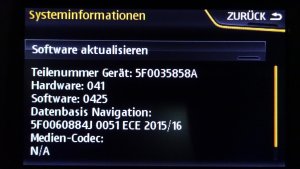
Meich ich schreib die TN schon nicht ins Forum

Aber wo hängt es denn dann im Update? Beim installieren via SD Karte oder danach? Danach "muss" ja die Werkstatt den Code eingeben und die STG prüfen.
Das ist eine Anleitung wie man beim Octavia Amundsen/Bolero (das kleine Navi MIB1) das Firmwareupdate durchführt.
Update Procedure:
1. Format your SD card / USB stick to FAT32
2. Download & unpack the archive to your card (3 folders and the text file should appear in the root directory)
3. Ignition ON (engine not running)
4. Very important step: switch off all consumers: headlights (switch to '0'), aircon, aux. heating, seat heating, remove your phone charger, etc. Disable the daytime running lights in the menu as well.
5. Insert your SD card in slot 1 / USB
6. (Long) press and hold the MENU button, service menu will appear
7. Select SW Update / Update / SD card / Release
8. You can select the components to update (all available selected by default, but you can verify that), press Next
9. Press Start
10. The update process will start and your headunit will restart several times. DON'T PRESS ANYTHING (takes about 20-60 minutes, depending on your current version)
11. 'Update summary' screen appears, just close it
12. 'Version back documentation' screen shows up (Press Cancel if you ignore the VCDS coding part)
13. Connect your VCDS cable and go to module 5F (Infotainment) / Adaptations / channel "Confirmation of installation change"
14. Check your 'Stored value'
15. Start Windows Calculator, set it to Programming mode (Alt-3) / Hex
16. Calculate the following: 'Stored value' Xor C9D2. DOUBLE CHECK IT. This is your 'New value'
17. Enter your 'New value' on the adaptation channel (in 'xx xx' format, using a space character). Click 'Do It!'
(An example: 1A1A Xor C9D2 is D3C8. You have to enter it as 'D3 C8'. This is just an example, don't use this!)
18. At this point your headunit may reboot automatically. If not, press Restart on the touchscreen.
19. Wait until your headunit works again, then turn ignition OFF and lock your car for 2-3 minutes (to let the system go to sleep).
20. Unlock your vehicle, ignition ON, connect your VCDS cable and start an Auto-Scan.
21. You will find a few fault codes on different modules caused by the update (17,19, 5F and probably 09). Clear those fault codes.
22. You are done.
23. Re-enable the daytime running lights and restore your touchscreen illumination level in the menu system.
VCDS coding can be ignored and/or can be done later.
Your headunit will work without coding, no problem.
Coding is necessary to clear some fault codes in the car's system caused by the update.
This part can be ignored but please note that in this case your dealer will know about the update.
When they hook up your car to their diagnostics unit they will see these fault codes and you can get into trouble (warranty, etc.)
If you skip the coding part just press Cancel on the touchscreen (at step 12).
When your head unit works again, do a force reboot: long press and hold the power button until Skoda logo appears again.
Don't start updating if your car was out of use for a longer period.
Update is done with ignition ON (without engine running) and can take up to 1 hour.
Your car has a battery management system. This will switch OFF ignition when low battery voltage is detected.
YOU CAN EASILY DESTROY YOUR HEADUNIT if this happens during the update!
Tip: Start the update after a longer trip to ensure a properly charged battery.